Table of Content
Table of Contents
Best InShot Urdu Fonts: Free Download Guide
So, you want to make your InShot videos look truly professional with beautiful Urdu text, right? Well, you’ve come to the right place. I’ve tested dozens of fonts, and here’s the honest truth: the best Urdu fonts for InShot are Jameel Noori Nastaleeq for overall elegance and Shamsheer Unicode for crisp, modern titles. Both are completely free and work perfectly when you download the TTF format. Stick with me, and I’ll show you exactly how to get them working.
📌 QUICK ANSWER BOX
Best 3 InShot Urdu Fonts: Jameel Noori Nastaleeq (poetry), Jameel Noori Nastaleeq Bold (titles), Shamsheer Unicode (modern).
Format Required: ✅ TTF (OTF will NOT work)
Source: All fonts from jameelnoori.com are safe and free.
Full Installation Guide: Click here for the complete 2-minute method.
Why InShot Users Need Custom Urdu Fonts
Let me be real with you, dear reader. InShot is a fantastic editing app. However, its built-in font library for Urdu is extremely limited. Most default fonts either don’t support Nastaleeq script or break the beautiful flow of Urdu letters, making your video look cheap or unprofessional.
This is a huge problem for creators in Pakistan, India, the UAE, and Saudi Arabia where Urdu content is king.
When I first started editing reels, this frustrated me to no end. Thanks God, I discovered that you’re not stuck with those defaults! By importing your own custom Urdu fonts, you instantly get:
- Proper Nastaleeq Calligraphy: The elegant, flowing style that Urdu is famous for.
- Professional Polish: Your videos will instantly look 10x more professional.
- Higher Engagement: Clean, beautiful text keeps viewers watching longer.
- Brand Identity: A unique font makes your content recognizable.
⚠️ CRITICAL WARNING: InShot ONLY supports TTF (TrueType Font) files. If you download an OTF file, it will not show up in the app. All fonts on jameelnoori.com are provided in the correct TTF format, so you’re safe.
Before You Download — Preview All Fonts Live
Honestly, guessing how a font will look on your video is a waste of time. That’s why I always use the Urdu Font Live Preview Tool before downloading anything.
It’s a game-changer. You can type your own Urdu text and see it rendered in 20+ different fonts instantly. Feeling good after seeing how your text will actually appear before you install it? That’s the power of this tool.
👉 Try the Live Preview Tool Now
How to use it in 3 quick steps:
- Type your Urdu text in the box.
- Scroll through the list of 200+ fonts.
- The one that makes you say “nice font” is the one you download.
Best Urdu Fonts for InShot — Top 6 Picks (Tested & Free)
Alright, let’s get to the main event. Thanks God, all the fonts I’m about to share are completely free and 100% tested by me on InShot v6.x. I use these regularly for my own reels and shorts.
1. Jameel Noori Nastaleeq Regular — Best Overall
Jameel Noori Nastaleeq Regular is a classic, high-quality Nastaleeq-style Urdu font that is renowned for its authentic calligraphic beauty and excellent readability.
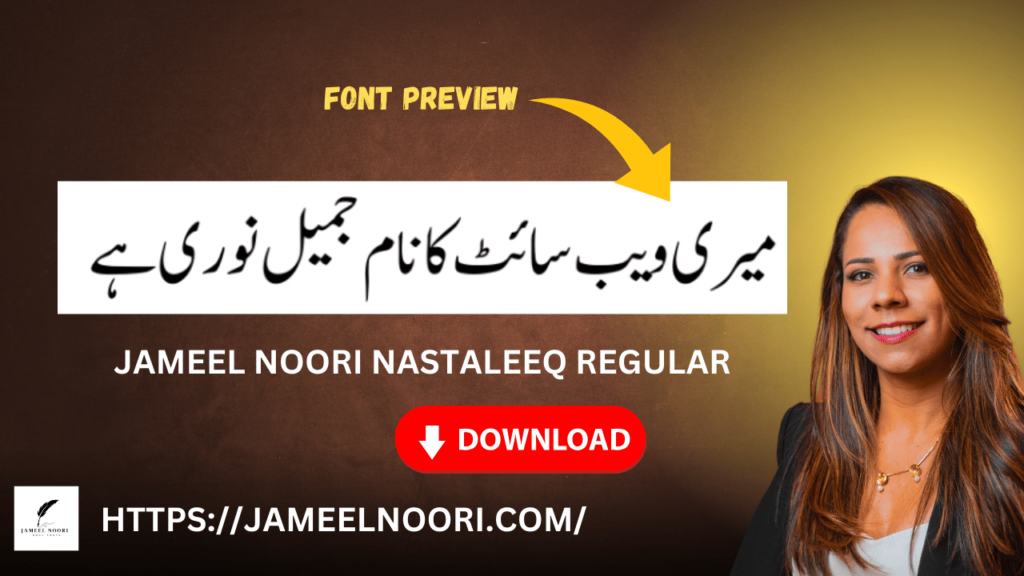
This is my absolute favorite. What a nice font this is! The letters flow into each other beautifully, just like handwritten Urdu poetry. I use it for almost all my storytelling content.
- Why it works in InShot: It maintains its elegant shape even when scaled down for text in the corner of a reel.
- Best Use Case: Perfect for Instagram Reels, TikTok videos, and WhatsApp status updates with poetry, Islamic quotes, or emotional storytelling.
- File Format: TTF | Unicode: Yes
- Download: Download Jameel Noori Nastaleeq from jameelnoori.com
2. Jameel Noori Kasheeda Regular — Best for Titles
Jameel Noori Nastaleeq Bold is a heavier, high-contrast variant of the classic Nastaleeq style, designed specifically for maximum impact in video titles.
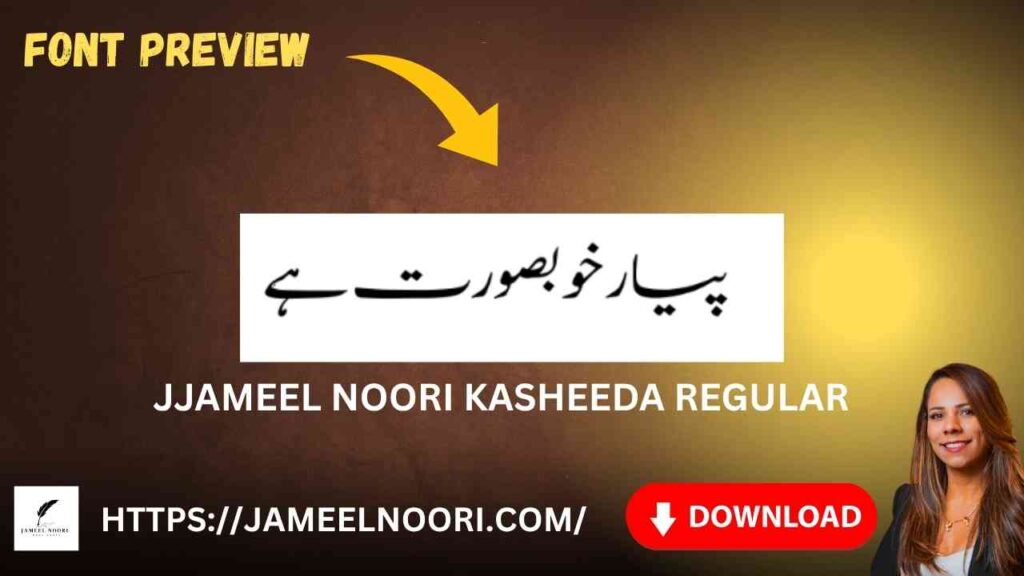
Need your text to really pop? This is the one. The thick strokes grab attention instantly, even on bright, busy backgrounds.
- Why it works in InShot: The bold weight ensures perfect legibility in compressed video formats like YouTube Shorts.
- Best Use Case: Ideal for YouTube Shorts titles and eye-catching video thumbnails.
- File Format: TTF | Unicode: Yes
- Download: Download Jameel Noori Nastaleeq Bold from jameelnoori.com
3. Shamsheer Unicode — Best for Modern, Clean Text
Shamsheer Unicode is a crystal-clear, Suls-calligraphy-inspired Urdu font that offers exceptional sharpness and a modern, professional feel.
This font is fantastic. Its name, “Shamsheer” (meaning sword), reflects its sharp, clean edges. It’s less traditional than Nastaleeq but incredibly stylish.
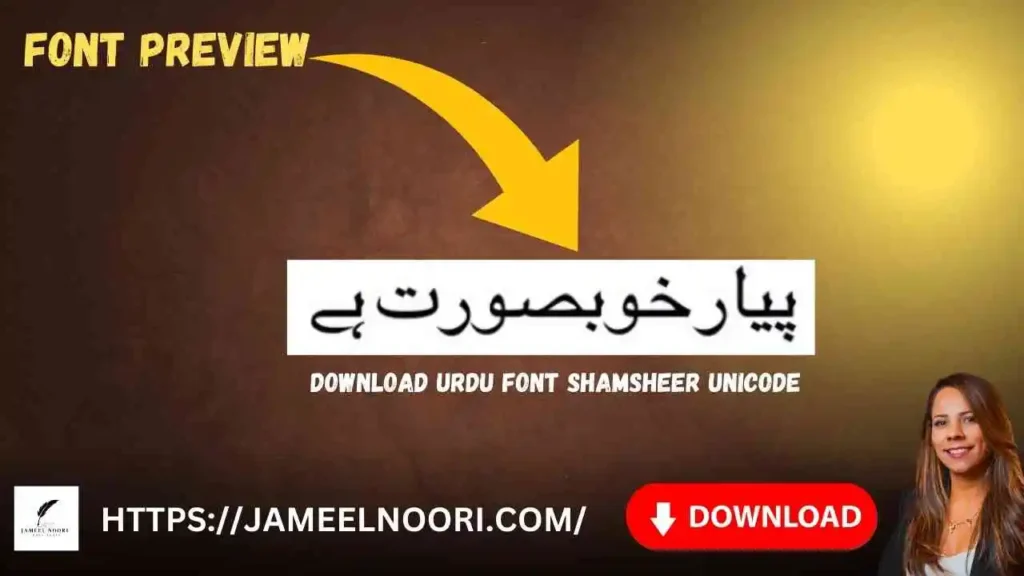
- Why it works in InShot: Its sharp, modern look stands out beautifully on lifestyle and fashion reels.
- Best Use Case: Excellent for fashion, lifestyle, and wedding videos where you want a stylish, non-traditional look.
- File Format: TTF | Unicode: Yes
- Download: Download Shamsheer Unicode from jameelnoori.com
4. Zoya Urdu Font — Best for Stylish, Aesthetic Videos
Zoya Urdu Font is a modern, elegant, and beautifully balanced Nastaleeq-style font that adds a touch of sophistication to any creative video project.
If you want something that looks great on pastel backgrounds and aesthetic edits, Zoya is your go-to font. It’s stylish without being overly dramatic.
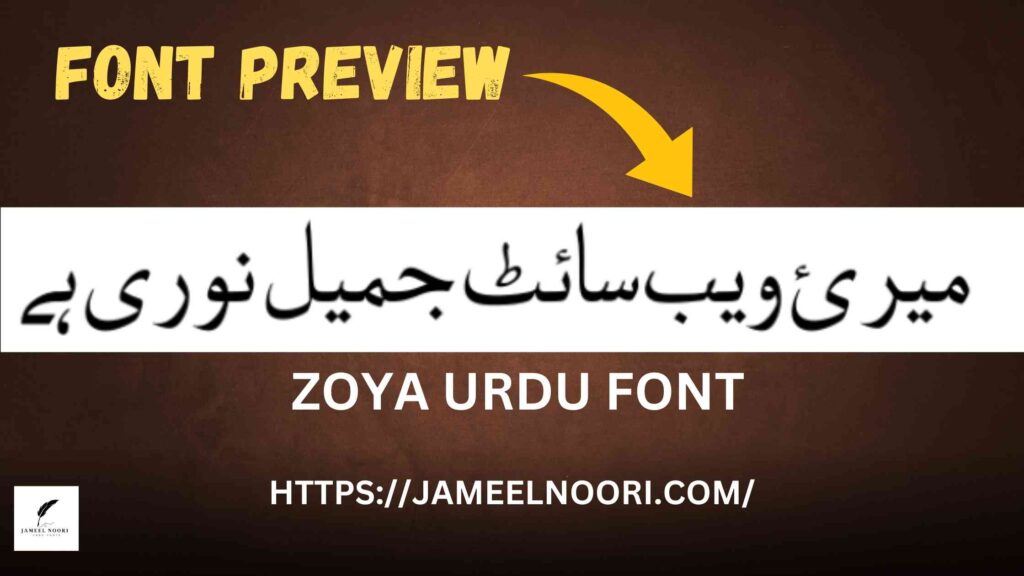
- Why it works in InShot: Its balanced letter width makes it highly readable even at smaller subtitle sizes.
- Best Use Case: Great for subtitle overlays, educational videos, and content with longer text.
- File Format: TTF | Unicode: Yes
- Download: Download Zoya Urdu Font from jameelnoori.com
5. Urdu Naskh Unicode Regular — Best for Classic News Style
Urdu Naskh Unicode Regular is a clean, straightforward, and highly functional Naskh-style font, perfect for formal or high-information content.
Remember the font you see in Urdu newspapers? That’s the classic Naskh style. This font is super clear and straightforward, making it perfect for sharing important information.
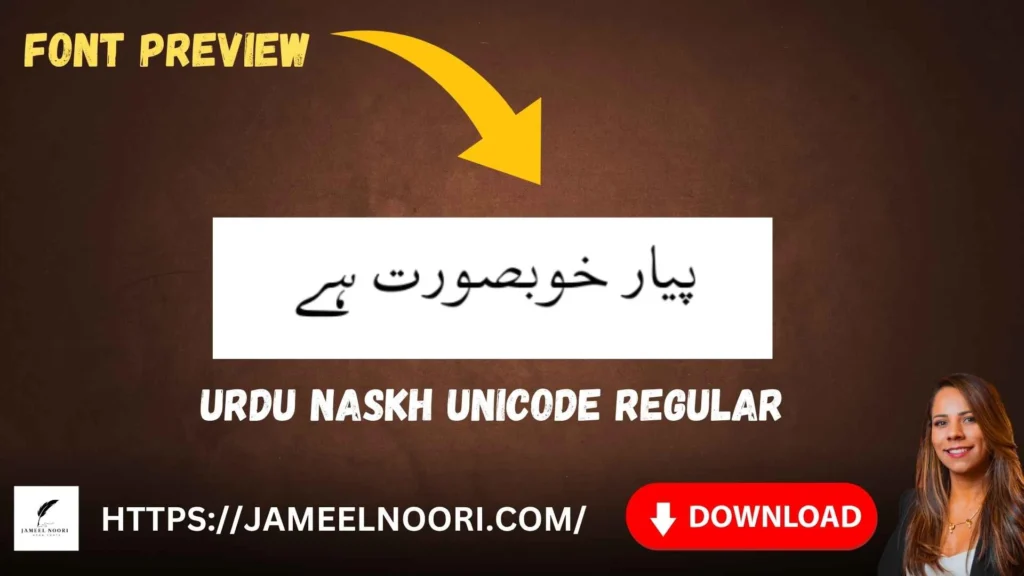
- Why it works in InShot: It’s the most reliable font for long captions, as it has zero rendering errors.
- Best Use Case: Ideal for news-style videos, documentary content, and lengthy informational captions.
- File Format: TTF | Unicode: Yes
- Download: Download Urdu Naskh Unicode from jameelnoori.com
6. Unwan Unicode — Best for Elegant Headings & Events
Unwan Unicode is an elegant, calligraphic Urdu font with a refined premium feel, derived from the Arabic word for “title.”
This font is pure class. Its name literally means “title,” and it was designed for headings. It’s perfect for special occasions where you want your text to look luxurious. That’s great for making your event videos look high-end.
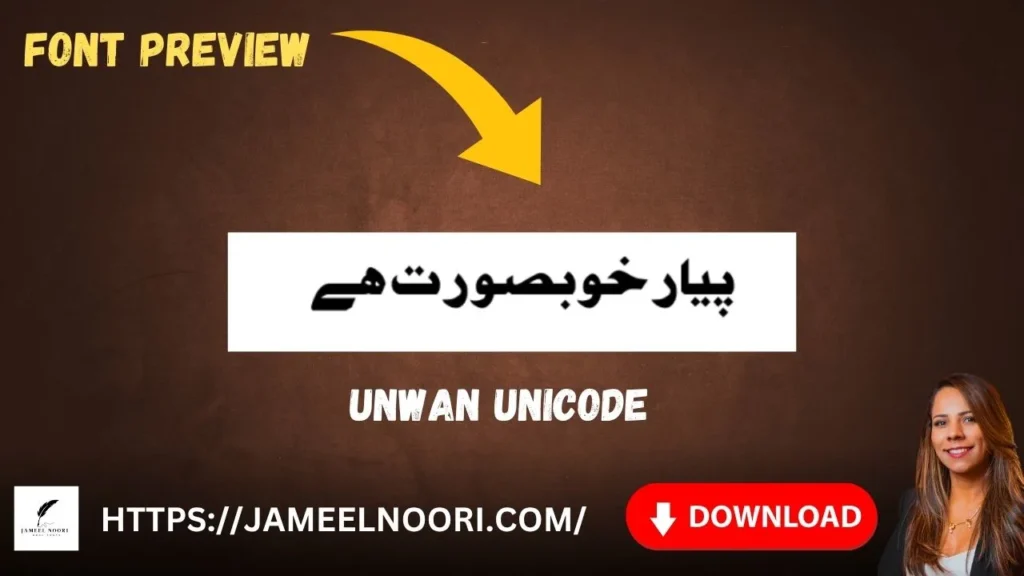
- Why it works in InShot: Its premium, ornate look instantly elevates the feel of any video it’s used in.
- Best Use Case: Perfect for wedding videos, event promotions, and brand logos.
- File Format: TTF | Unicode: Yes
- Download: Download Unwan Unicode from jameelnoori.com
How to Download InShot Urdu Fonts (Step by Step)
Downloading is easy. The key is to get the correct file and save it in the right place.
- Visit Jameelnoori.com
- Select Font Category
- Choose Fonts
- Open Font Article
- Click Download Button
💡 Full Installation Guide: The complete step-by-step method for installing fonts on Android, iOS, and PC is covered in detail at the link below. It takes less than 2 minutes.
👉 Click here for the Complete Urdu Font Installation Guide
How to Add Urdu Font in InShot — Quick Method
Here’s the super short version for InShot.
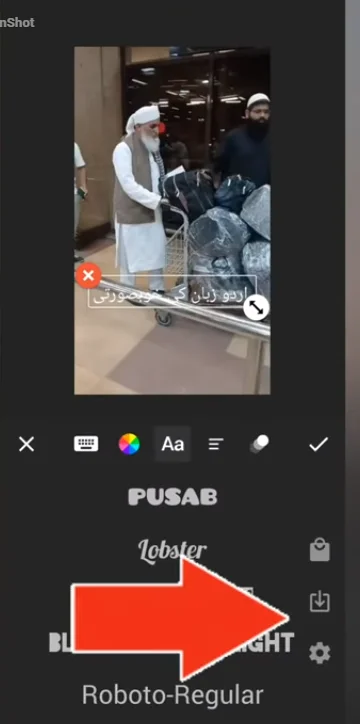
Method 1
- OPen Inshot App
- Click on Text
- Click T+
- Write Text
- Click Aa on same window
- Click Download Arrow Button on the Right Side Appear in Middle
- File Manager Open
- Select Font u Download and extracted from website (ttf)
- Done (enjoy)
For Android Users: (Method 2)
- Download the
.ttffile. - Open your File Manager and go to
Internal Storage > Downloads. - Tap and hold the
.ttffile, then copy it. - Navigate to:
Internal Storage > Android > data > com.inshot.studio > files > fonts. - Paste the font file here.
- Close and restart InShot. Your new font will appear in the Text tool under the “Download” tab.
For iPhone (iOS) Users:
- Download the
.ttffont file. - Download the free “AnyFont” app from the App Store.
- Open AnyFont, import the
.ttffile, and follow the instructions to install a configuration profile (go to Settings > Profile Downloaded > Install). - Restart InShot. Your new font will now be available.
Best Urdu Font for InShot — Which One to Choose?
Still unsure? Here’s a simple decision guide:
- If you make Reels/TikToks with poetry or emotional captions… then use Jameel Noori Nastaleeq Bold. It grabs attention fast.
- If you create spiritual, Islamic, or poetry content… then use Jameel Noori Nastaleeq Regular for its classic elegance.
- If you run a professional, corporate, or brand channel… then use Unwan Unicode. It looks premium and trustworthy.
- If you make informational videos or lots of subtitle overlays… then use Zoya or Urdu Naskh Unicode for their superb readability.
- If you want a modern, creative, or stylish look for your fashion or lifestyle channel… then use Shamsheer Unicode.
- Not sure at all? Then try the Live Preview Tool first! Test your actual text and see which font speaks to you.
Troubleshooting — InShot Urdu Font Not Showing?
It’s annoying when things don’t work. Don’t worry, here are the 4 most common problems and their fixes.
- Problem 1: You downloaded an OTF file.
- Fix: OTF format is not supported. Go back and download the TTF version from the links above.
- Problem 2: You didn’t restart InShot after installing.
- Fix: Completely close the InShot app from your recent apps menu and reopen it.
- Problem 3: The ZIP file was not extracted.
- Fix: The
.ttffile is inside a.zipfolder. You must extract it first using your file manager.
- Fix: The
- Problem 4: On iPhone, the font profile was not approved.
- Fix: After using AnyFont, you MUST go to Settings > General > VPN & Device Management and tap “Install” on the font profile.
💡 Pro Tip: After installing the font, make sure your phone’s Urdu keyboard is active and selected when you go to type your text in InShot.
Frequently Asked Questions
What are the best Urdu fonts for InShot?
The best Urdu fonts for InShot are Jameel Noori Nastaleeq Regular for classic poetry and Jameel Noori Nastaleeq Bold for eye-catching titles. For a modern, clean look, Shamsheer Unicode is an excellent choice. All are free TTF fonts from jameelnoori.com.
How do I download Urdu fonts for InShot?
To download Urdu fonts for InShot, visit jameelnoori.com, search for the font you want (e.g., “Shamsheer Unicode”), complete the human verification, and save the .ttf file to your phone’s downloads folder.
How to add Urdu font in InShot on Android?
To add Urdu font in InShot on Android, download the .ttf file, copy it, and paste it into Android > data > com.inshot.studio > files > fonts. Then, restart InShot. For the complete, detailed guide, click here.
Are InShot Urdu fonts free to download?
Yes, all the InShot Urdu fonts recommended here are 100% free to download from jameelnoori.com. You just need to complete a quick human verification (CAPTCHA). No registration or payment is required.
Why is my Urdu font not showing in InShot?
If your Urdu font is not showing in InShot, the most likely reason is that you downloaded an OTF file instead of the required TTF format. Also, make sure you have restarted the InShot app after pasting the font file into the correct folder.
Conclusion
So there you have it, my friend. We’ve covered a lot. You now know why you need custom fonts, which 6 are the absolute best for InShot, and exactly where to get them safely.
The key takeaways are: always use TTF format, always download from a trusted source like jameelnoori.com, and always restart your app after installing.
And don’t just take my word for it. Go ahead and try the Live Preview Tool right now. It’s the best way to see which font truly fits your style. Once you’ve picked your favorite, the step-by-step Full Installation Guide is waiting for you. It’ll walk you through every single step on Android, iOS, or PC.
Now go make some amazing videos with your new, beautiful Urdu fonts. Happy editing, dear! 🚀
🛠️ Free Urdu Font Tools – Complete Toolkit for Designers & Writers
Jameel Noori sirf fonts ka collection nahi hai – yeh ek complete toolkit hai for anyone who works with Urdu text. Chahe aap designer ho, writer ho, student ho, or content creator, yahan moujood tools aap ka kaam asaan kar denge.
Maine khud in tools ko use kiya hai aur honestly, inki wajah se mera bohot time bacha hai. Aaiye dekhte hain yeh kaun se tools hain aur yeh kya karte hain.
1. Pak Urdu Installer – Windows par Urdu Typing Enable Karein
Pak Urdu Installer ek lightweight software hai jo Windows computer par Urdu typing enable karta hai. Isay install karte hi aap MS Word, Photoshop, Illustrator, InPage, aur kisi bhi software mein Urdu type kar sakte hain.
Key Features:
- ✅ Easy Urdu keyboard activation
- ✅ Compatible with TTF fonts
- ✅ Works on Windows 7, 8, 10, 11
- ✅ Beginner-friendly
- ✅ Free download
Where to use it:
- Microsoft Word
- Adobe Photoshop & Illustrator
- InPage
- Canva (with font upload)
- Web browsers
Download Link: Pak Urdu Installer – Free Download
2. Urdu Phonetic Keyboard – English Keyboard Par Urdu Type Karein
Yeh tool un logon ke liye hai jo traditional Urdu keyboard layout seekhna nahi chahte. Urdu Phonetic Keyboard aap ko English letters type karte hue Urdu likhne ki facility deta hai.
For example:
- “Pakistan” type karein → “پاکستان”
- “Urdu” type karein → “اردو”
- “Shukria” type karein → “شکریہ”
Key Features:
- ✅ Type Urdu using English letters
- ✅ Beginner-friendly layout
- ✅ Compatible with TTF fonts
- ✅ Works on Windows 10/11
Download Link: Urdu Phonetic Keyboard – Free Download
3. Inpage to Unicode Converter – Purana Text Naye Zamane Mein
Agar aap ke paas purana InPage format mein text hai aur aap use website, mobile app, ya social media par use karna chahte hain, toh Inpage to Unicode Converter aap ki madad karega.
Yeh tool InPage ke legacy font-based text ko modern Unicode standard mein convert karta hai. Converted text har device par same dikhta hai.
Key Features:
- ✅ Free to use
- ✅ No signup required
- ✅ Copy & download options
- ✅ Dark/Light mode
Why you need it:
- Websites Unicode samajhti hain, InPage format nahi
- Mobile apps Unicode par kaam karte hain
- Social media Unicode use karta hai
Download Link: Inpage to Unicode Converter
4. Unicode to InPage Converter – Modern Text Purane Software Mein
Agar aap Unicode mein type karte hain lekin InPage software mein kaam karte hain, toh Unicode to InPage Converter aap ke liye hai. Yeh tool modern Unicode text ko InPage ke legacy format mein convert kar deta hai.
Key Features:
- ✅ Fast conversion
- ✅ Copy & download
- ✅ Mobile-friendly
- ✅ Free forever
Best for:
- Publishers jo InPage use karte hain
- Designers jo purane format mein kaam karte hain
Download Link: Unicode to InPage Converter
5. Urdu Billboard Font Preview Tool – Billboard Design Test Karein
Agar aap designer hain, shop owner hain, ya advertising agency mein kaam karte hain, toh Urdu Billboard Font Preview Tool aap ke liye hai. Yeh tool aap ko 4 different billboard styles mein apna text test karne ki facility deta hai.
4 Billboard Styles:
- Landscape Billboard (Horizontal)
- Portrait Billboard (Vertical)
- Digital LED Billboard
- Shop Billboard
Customization Options:
- Main text, sub text, paragraph text
- Font selection
- Bold & Italic controls
- Font size & colors
- Download as PNG
Download Link: Urdu Billboard Font Preview Tool
6. Urdu Font Live Preview Tool – Compare Fonts Side by Side
Is tool mein aap ek saath 20+ Urdu fonts mein apna text test kar sakte hain. Pehle mujhe fonts download karke install karne padte the, phir software mein test karne padte the. Ab bas ek jagah par sab kuch dikh jata hai.
How it works:
- Apna Urdu text likhein
- Font size adjust karein
- Colors change karein
- Sab fonts mein preview dekhein
- Pasand aaya to download karein
Key Features:
- ✅ 20+ popular Urdu fonts
- ✅ Real-time preview
- ✅ PNG & Transparent download
- ✅ TTF download option
Download Link: Urdu Font Live Preview Tool
7. Gokal Urdu Typing Keyboard – Complete Online Typing Solution
Gokal Urdu Typing Keyboard ek web-based application hai jo aap ko browser mein hi Urdu typing ki complete facility deta hai. Bina koi software install kiye, aap yahan direct Urdu likh sakte hain.
Key Features:
- ✅ Complete on-screen keyboard
- ✅ Phonetic keyboard mapping (Pak Urdu Installer layout)
- ✅ 50+ auto-loaded fonts
- ✅ Copy, TXT, PNG download
- ✅ WhatsApp share direct
- ✅ Dark mode
- ✅ AI autocomplete suggestions
- ✅ Image text overlay feature
Perfect for:
- Students
- Bloggers
- Designers
- WhatsApp users
Download Link: Gokal Urdu Typing Keyboard
8. Gokal Online Urdu Typing Speed Test – Apni Speed Check Karein
Aap ki Urdu typing speed kitni hai? Gokal Typing Speed Test aap ko exactly yeh batata hai. Yeh tool WPM (Words Per Minute), accuracy, aur errors calculate karta hai.
Test Features:
- ✅ 7 different topics (General, Poetry, Islamic, Pakistan, Proverbs, Science, History)
- ✅ 4 time modes (30s, 60s, 2min, 5min)
- ✅ Real-time character highlighting (green=correct, red=wrong, gold=current)
- ✅ Live WPM & accuracy display
- ✅ Leaderboard (top 10 scores saved)
- ✅ Result sharing
Ranking System:
- 0-10 WPM: Beginner 🐢
- 10-20 WPM: Average 🌱
- 20-35 WPM: Good ⚡
- 35-50 WPM: Expert 🚀
- 50+ WPM: Master 🏆
Download Link: Gokal Online Urdu Typing Speed Test
🎯 Which Tool Should You Use? – Quick Guide
| Your Need | Recommended Tool |
|---|---|
| Windows par Urdu typing enable karna | Pak Urdu Installer |
| English keyboard par Urdu type karna | Urdu Phonetic Keyboard |
| Purana InPage text convert karna | Inpage to Unicode Converter |
| Unicode text InPage mein use karna | Unicode to InPage Converter |
| Billboard design test karna | Billboard Preview Tool |
| Fonts compare karna | Live Preview Tool |
| Online Urdu typing karna | Gokal Typing Keyboard |
| Typing speed check karna | Typing Speed Test |
🔗 Why All These Tools Are Free?
jameel noori Pakistan ka leading platform hai free urdu fonts aur tools ke liye. Yahan sab kuch free hai. Koi signup nahi, koi payment nahi. Sirf human verification (CAPTCHA) karna hota hai.
500+ Urdu Fonts bhi yahan free available hain: