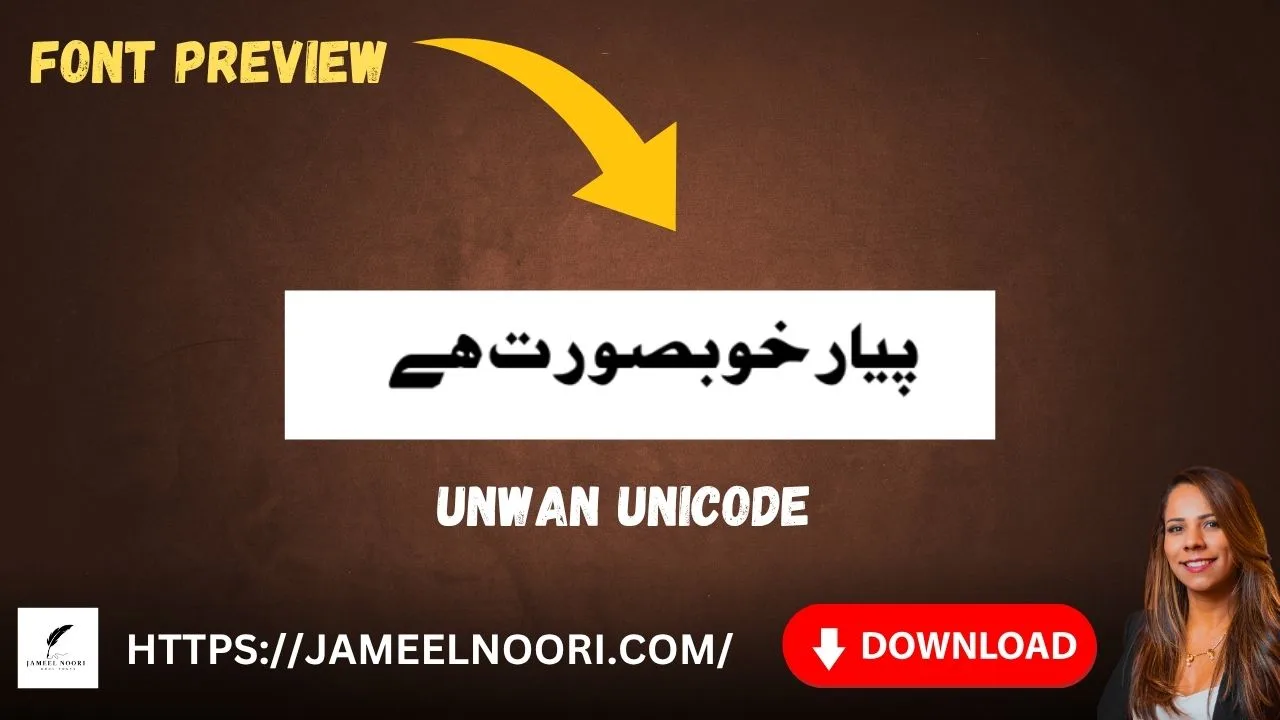
Introduction – Unwan Unicode Font
agar aap ek elegant aur stylish Urdu font dhoond rahe hain jo aap ke design projects ko professional look de, to Unwan Unicode Font aap ke liye best choice hai. yeh ek TrueType font (TTF) hai jo specially designers, content creators, aur Urdu typography lovers ke liye banaya gaya hai.
Unwan Unicode Font ko ab tak 22,913+ dafa download kiya ja chuka hai aur users ne ise 4.38 out of 5 ki zabardast rating di hai. yeh rating is font ki quality aur popularity ko darshati hai.
is complete guide mein main aap ko batata hun ke Unwan Unicode Font download kaise karein, kaise install karein, aur kaise use karein MS Word, Photoshop, Canva aur mobile apps mein. agar aap free Urdu fonts ki collection dekhna chahte hain to Jameel Noori website par 500+ fonts available hain.
Table of Contents
Table of Contents
What is Unwan Unicode Font?
Unwan Unicode Font ek stylish aur elegant Urdu font hai jo TrueType format (TTF) mein available hai. yeh font un designers ke liye perfect hai jo apne projects mein unique aur attractive Urdu typography add karna chahte hain.
is font ka design traditional aur modern elements ka perfect blend hai. yeh Urdu calligraphy font style mein likha gaya hai jo isay poetry, Islamic content, aur creative designs ke liye ideal banata hai.
Unwan font ki sab se khaas baat iski Unicode support hai. is ka matlab yeh hai ke yeh font almost sab modern devices aur software par smoothly kaam karta hai. chahe aap Windows use kar rahe hon, Mac, ya mobile – yeh font har jagah consistent dikhta hai.
agar aap stylish Urdu font ki talash mein hain to Jameel Noori Nastaleeq Regular bhi aap check kar sakte hain.
History of Unwan Unicode Urdu Font
Unwan Unicode Font ki creation ka maqsad tha Urdu typography mein ek naya aur elegant style add karna. yeh font un designers ke liye banaya gaya jo traditional calligraphy aur modern design ke beech balance chahte the.
is font ka naam “Unwan” arabic word se liya gaya hai jiska matlab hai “title” ya “heading”. yeh font headings aur titles ke liye special design kiya gaya hai.
pehle zamane mein Urdu fonts limited the aur unicode support bhi kam tha. lekin technology ke sath sath Urdu fonts bhi evolve hue. Unwan Unicode Font is evolution ka ek perfect example hai jo traditional beauty aur modern functionality dono provide karta hai.
agar aap Urdu typography ki history mein interested hain to Blog par mazeed articles padh sakte hain.
Unwan Unicode Font vs Other Urdu Fonts
jab aap Unwan Unicode Font ka comparison doosre Urdu fonts se karte hain to kuch important differences nazar aate hain:
| Feature | Unwan Unicode | Traditional Nastaleeq | Modern Sans-Serif |
|---|---|---|---|
| Style | Elegant Calligraphic | Classic | Clean & Simple |
| Best Use | Headings, Poetry | Long Text | Digital UI |
| Unicode Support | Full | Partial | Full |
| File Size | Lightweight | Medium | Small |
| Readability | High for Headings | High for Body | Excellent |
Unwan font unique hai kyunke yeh traditional calligraphy ki beauty ko modern readability ke sath combine karta hai. yeh isay headings, titles, aur short text ke liye perfect banata hai.
agar aap Alfars Bold jaise bold fonts bhi try karna chahte hain to wo bhi available hai.
Who Is the Owner or Designer of Unwan Font?
Unwan Unicode Font Jameel Noori ke platform par available hai. Jameel Noori Pakistan-based typography expert hain jo free Urdu fonts provide karne ke liye mashhoor hain.
Jameel Noori ka mission hai ke har koi quality Urdu fonts tak free access rakhe. unki website jameelnoori.com par 500+ fonts available hain jo designers, students, aur content creators free mein use kar sakte hain.
agar aap Jameel Noori ke baare mein aur janna chahte hain to About Us page visit karein.
License Information – Is Unwan Font Free?
haan, Unwan Unicode Font bilkul free hai. aap ise bina kisi payment ke download kar sakte hain aur personal aur commercial dono projects mein use kar sakte hain.
License Details:
- ✅ Personal use – free
- ✅ Commercial use – free
- ✅ Modification – not allowed
- ✅ Redistribution – not allowed without credit
agar aap is font ko commercial project mein use kar rahe hain to credit dena recommended hai. Terms & Conditions page par mazeed details hain.
Where Is Unwan Unicode Font Commonly Used?
Unwan Unicode Font ki versatility isay bohot se projects mein use karne ki freedom deti hai:
- YouTube Thumbnails – attractive headings ke liye best
- Poetry Books – elegant Urdu poetry ke liye
- Islamic Content – Quranic verses aur Islamic posts
- Social Media Graphics – Instagram, Facebook posts
- Logo Design – brand identity ke liye
- Wedding Cards – traditional aur elegant look
- Educational Material – headings aur titles
- Website Headers – Urdu websites ke liye
agar aap Canva Mein Urdu Font Kaise Add Karein janna chahte hain to Canva Guide dekh sakte hain. Photoshop Guide ke liye Photoshop Guide helpful hai.
Key Features of Unwan Unicode Font
Unwan Unicode Font kai powerful features ke sath aata hai:
| Feature | Description |
|---|---|
| Elegant Design | Stylish calligraphic look |
| TrueType Format | Easy to install and use |
| Unicode Support | Works on all modern devices |
| Lightweight | Fast download and installation |
| High Readability | Clear even at small sizes |
| Wide Compatibility | Windows, Mac, Linux, Mobile |
Unwan font ki stylish design isay doosre Urdu fonts se alag banati hai. yeh traditional calligraphy ki beauty ko modern touch ke sath present karta hai. agar aap Urdu Font Tools bhi use karna chahte hain to Urdu Phonetic Keyboard se typing asaan ho jati hai.
How to Download Unwan Unicode Font from Jameel Noori
Unwan Unicode Font download ka process bohot simple hai:
- Step 1: apna browser open karein aur jameelnoori.com par jayein
- Step 2: search bar mein “Unwan Unicode Font” type karein aur Enter press karein
- Step 3: font result par click karein to open font download page
- Step 4: human verification complete karein (I am not a robot)
- Step 5: Download Now button par click karein
- Step 6: ZIP file download ho jayegi – extract karein
- Step 7: .ttf file apne computer ya mobile mein save kar lein
download hone ke baad aap font install kar sakte hain. agar aap mazeed free Urdu fonts dhoond rahe hain to All Free Urdu Fonts collection zaroor dekhein.
How to Install Unwan Unicode Font on Windows
Windows par Unwan Unicode Font install karna quick aur easy hai:
Method 1 – Quick Install:
- downloaded ZIP file extract karein aur Unwan Unicode .ttf file locate karein
- font file par right-click karein
- “Install” select karein menu se
- font kuch seconds mein install ho jayega
Method 2 – Drag and Drop:
- Windows Control Panel mein Fonts folder open karein
- Unwan Unicode .ttf file ko Fonts folder mein drag karein
- font automatically install ho jayega
Method 3 – Double Click:
- Unwan Unicode .ttf file par double-click karein
- font preview window mein “Install” button click karein
installation ke baad font aap ke sab applications mein available hoga. details ke liye Windows 10 Installation Guide dekh sakte hain.
How to Install Unwan Unicode Font on Mac
Mac par Unwan Unicode Font install karna bhi bohot simple hai:
- Unwan Unicode .ttf file download karein
- font file par double-click karein
- Font Book application mein “Install Font” click karein
- font install ho jayega aur ready to use
aap ab Unwan font ko Pages, Keynote aur apne sab Mac applications mein use kar sakte hain.
How to Install Unwan Unicode Font on Android
Android phone ya tablet par Unwan font for mobile use karne ke liye:
For Apps Like Pixellab, Canva, Kinemaster:
- Unwan Unicode .ttf file download karein
- apna file manager open karein aur downloaded font find karein
- font file ko app ke font folder mein copy ya move karein
- app open karein aur font list se Unwan Unicode select karein
For System-wide Fonts:
- kuch Android devices font installation allow karte hain Settings se
- aap ko font installer app ki zaroorat ho sakti hai
agar aap Kinemaster Ke Liye Urdu Fonts use karna chahte hain to Kinemaster Fonts Guide dekh sakte hain.
How to Install Unwan Unicode Font on iPhone/iPad
iPhone aur iPad users ke liye:
Using Font Installer Apps:
- Unwan Unicode .ttf file download karein
- font manager app install karein jaise iFont ya AnyFont
- app open karein aur font file import karein
- profile installation instructions follow karein
- installation ke baad font compatible apps mein available hoga
For Specific Apps:
- kuch apps jaise Canva aur Pages custom fonts support karte hain
- aap Unwan font directly in apps mein use kar sakte hain
How to Change Urdu Font in iPhone guide bhi helpful hai.
How to Use Unwan Unicode Font in MS Word
Unwan Unicode Font for MS Word use karne ke liye:
- font system par install karein
- Microsoft Word open karein
- wo text select karein jahan aap Unwan font use karna chahte hain
- font dropdown menu mein click karein
- scroll down karein aur Unwan Unicode select karein
- Urdu typing start karein
MS Word Complete Guide mein aur details hain.
How to Use Unwan Unicode Font in Adobe Photoshop
Unwan font in Photoshop use karne ke liye:
- font system par install karein
- Adobe Photoshop open karein
- Text Tool (T) select karein
- canvas par click karein text layer banane ke liye
- Character panel mein font dropdown se Unwan Unicode select karein
- Urdu text type karna start karein
Tips for Photoshop:
- large font sizes use karein better visibility ke liye
- layer styles apply karein Urdu typography enhance karne ke liye
Photoshop Guide mein aur tips hain.
How to Use Unwan Unicode Font in Canva
Unwan font for Canva use karna bohot easy hai:
On Desktop:
- Canva open karein aur new design banayein
- text element add karein
- font dropdown menu click karein
- agar aap ne font computer par install kiya hai to list mein aayega
- Unwan Unicode select karein
On Mobile:
- Unwan Unicode .ttf file download karein
- device mein save karein
- Canva open karein aur text element select karein
- font upload karein device se
- Unwan font font library mein add ho jayega
Canva Guide mein step-by-step bataya gaya hai.
How to Use Unwan Unicode Font in Illustrator
Adobe Illustrator mein bhi Unwan Unicode achha kaam karta hai:
- font system par install karein
- Illustrator open karein
- Type Tool select karein
- Character panel mein font list se Unwan Unicode choose karein
- artboard par click karein aur typing start karein
How to Use Unwan Unicode Font in Kinemaster
video editors ke liye Kinemaster mein Unwan font use karne ka tareeqa:
- Unwan Unicode .ttf file download karein
- file manager open karein aur font copy karein
- Kinemaster font folder mein paste karein: Android/media/com.nexstreaming.app.kinemaster/files/font
- Kinemaster open karein, text add karein, aur Unwan Unicode select karein
How to Use Unwan Unicode Font in Pixellab
Pixellab Urdu text designs ke liye popular hai:
- Unwan Unicode .ttf file download karein
- Pixellab open karein aur new project banayein
- Text button tap karein
- top par font name tap karein
- “Add Font” tap karein aur downloaded font file select karein
- Unwan font font list mein show hoga
Common Problems and Solutions
Problem 1: Unwan Font Not Showing in Applications
Solution: application restart karein font install karne ke baad. agar phir bhi na show ho to computer restart karein.
Problem 2: Font Installed but Not Working Properly
Solution: ensure karein ke aap ne sahi Unwan Unicode Font download kiya hai. font delete karke dobara install karein.
Problem 3: Urdu Text Displaying Incorrectly
Solution: ensure karein ke aap ka application Urdu script support karta hai. MS Word ke liye Urdu language settings mein add karein.
Problem 4: Font File Corrupted During Download
Solution: Unwan Font download dobara karein Jameel Noori website se. human verification dobara complete karein.
Problem 5: Canva Not Showing Installed Font
Solution: Canva desktop system fonts use karta hai. font computer par install karein, phir Canva refresh karein.
Problem 6: Unwan Font Not Working in Mobile Apps
Solution: ensure karein ke aap ne font sahi folder mein paste kiya hai. app restart karein.
Expert Tips for Using Unwan Unicode Font
1. Use for Headings
Unwan Unicode headings aur titles ke liye best hai. body text ke liye simple fonts use karein.
2. Pair with Simple Fonts
is font ko simple sans-serif fonts ke sath combine karein for better hierarchy.
3. Use Appropriate Font Size
headings ke liye large sizes use karein. Unwan font ki elegance large size mein best dikhti hai.
4. High Contrast Colors
dark text light background par use karein for better readability.
5. Layer Styles
Photoshop ya Canva mein shadow aur outline add karein to make text pop.
6. Save Your Designs
apne favorite Unwan font designs ka folder rakhein. reuse kar sakte hain future projects mein.
7. Test on Different Devices
ensure karein ke font desktop, tablet aur mobile screen par achha lag raha hai.
8. Use Urdu Font Tools
Urdu Font Tools use karein typing aur installation easy banane ke liye.
Why Choose Jameel Noori for Urdu Fonts?
Jameel Noori Pakistan ka leading platform hai free Urdu fonts ke liye:
- 100% Free Downloads – no signup, no payment
- 500+ Urdu Fonts – sab se badi collection
- Easy Installation Guides – step-by-step tutorials
- Original Tools – Urdu Phonetic Keyboard, Pak Urdu Installer
- Expert Support – font installation mein help
- Regular Updates – new fonts har week
agar aap best Urdu font for design dhoond rahe hain to All Free Urdu Fonts collection zaroor dekhein. Arabic Fonts bhi available hain.
Final Thoughts
Unwan Unicode ek elegant, stylish aur professional Urdu font hai jo har designer ke collection mein hona chahiye. iski beautiful calligraphy style aur Unicode support isay versatile banati hai.
is guide mein aap ne seekha:
- what is Unwan Unicode and why it’s special
- how to download Unwan Unicode from Jameel Noori
- how to install Unwan font on Windows, Mac, Android, iPhone
- how to use in MS Word, Photoshop, Canva, aur mobile apps
- common problems and solutions
- expert tips for better font usage
ab aap ki baari hai. Unwan Font download aaj hi karein aur apne Urdu designs ko elegant touch dein.
agar koi question ho to Contact Jameel Noori karein. Blog par mazeed guides bhi available hain.
FAQs About Unwan Unicode Font
What is Unwan Unicode Font?
Unwan Font ek elegant TrueType Urdu font hai jo headings, titles, aur creative designs ke liye perfect hai. iski stylish calligraphy look isay poetry aur Islamic content ke liye ideal banati hai.
Is Unwan Unicode Font free to download?
haan, Unwan Unicode bilkul free hai. aap ise jameelnoori.com se bina kisi payment ke download kar sakte hain. personal aur commercial dono use ke liye free hai.
How do I install Unwan Unicode Font on Windows?
Windows par font install karne ke liye .ttf file download karein, file par right-click karein, aur “Install” select karein. details ke liye Windows 10 Installation Guide dekh sakte hain.
Can I use Unwan Unicode Font in Canva?
haan, aap Unwan Unicode Canva mein use kar sakte hain. desktop par font computer par install karein aur Canva refresh karein. Canva Guide mein step-by-step bataya gaya hai.
Does Unwan Unicode Font work in Photoshop?
haan, Unwan Unicode Adobe Photoshop mein perfectly kaam karta hai. font system par install karne ke baad yeh Photoshop font dropdown menu mein appear hoga.
What is the download count of Unwan Unicode Font?
Unwan Unicode Font ko ab tak 22,913+ dafa download kiya ja chuka hai aur users ne ise 4.38 out of 5 rating di hai.
Where can I find more stylish Urdu fonts?
aap jameelnoori.com par 500+ free Urdu fonts dekh sakte hain. All Free Urdu Fonts collection mein sab fonts available hain.
Can I use Unwan Unicode Font for commercial projects?
haan, Unwan Unicode Font personal aur commercial dono projects ke liye use kar sakte hain. font free hai aur commercial use allowed hai.
What type of font is Unwan Unicode?
Unwan Unicode ek TrueType Font (TTF) hai jo Unicode support ke sath aata hai. yeh Windows, Mac, aur mobile devices par smoothly kaam karta hai.
How do I fix Unwan Unicode Font not showing in applications?
agar font show nahi ho raha to installation ke baad computer restart karein. agar problem persists to font dobara install karein. Blog par mazeed solutions hain.
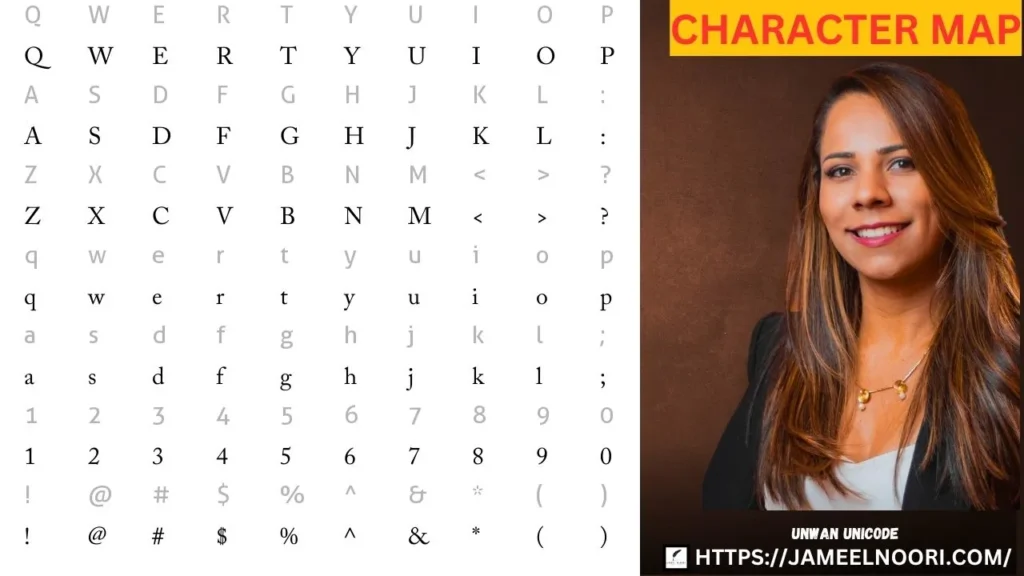
DMCA Copyright Note: Unwan Unicode Font is a free Urdu font available for personal and commercial use. If you are the original creator of this font and believe your rights have been violated, please contact Jameel Noori at [email protected] with proof of ownership. We respect intellectual property rights and will address any valid concerns promptly.